SuperSpock and the KVM client.
The GL.iNet Comet RM1 already has a browser client. I started a native macOS replacement to learn its protocol, then followed the evidence from a dead Janus endpoint to GL.iNet’s working Pion gateway. “SuperSpock” is a codename pending a final name when the project is finished.
This note stops at the current evidence. The browser client displays video, and the native client now negotiates through the device’s Pion gateway and receives a video track. Input handling is still unfinished.
Current status: active project; native Pion/WebRTC video now negotiates and receives a track, while input handling remains unfinished.
What broke: DNS, then TLS, then focus, then a dead Janus endpoint before the device’s Pion gateway explained the working path.
Would I build it again? Yes, but I would start with the protocol map and certificate behavior before polishing the window.
The remaining work is the input path: connecting keyboard and pointer events to the working native video surface. The browser client remains the known-good reference.
A KVM-over-IP switch gives keyboard, video, and mouse access below the operating system. That matters when the remote machine is headless, sitting at a BIOS screen, or halfway through an install. Mine is a GL.iNet Comet RM1.
“Let me know what is wrong with my KVM switch not displaying my Mac mini’s display and saying something about Janus server disconnected.”
GL.iNet ships a usable web interface. I wanted a separate Mac window, a Dock icon, and local credential handling instead of another browser tab with an autofilled password.
That small difference was enough to start another project. The first goal was a window that behaved like a Mac app.
This was supposed to be a tidy little wrapper. Then I found out that “native app” meant owning the resolver, the certificate policy, the WebRTC session, the input path, and the part of macOS that decides whether your executable deserves a real window. So, naturally, it became a project.
Overlook is the reference implementation
During the project I found Overlook, an open-source native macOS client for the same GLKVM family. It already has working video, OCR capture, discovery, and a menu-bar agent. It is GPLv3, as is my project.
If you need a working native client today, use Overlook. This page links to it because its code and documentation gave me a concrete protocol trail, not because it is a drop-in replacement for SuperSpock.
Reading the RM1’s shipped frontend changed the task. The video path was not an unknowable vendor trick. It was a Pion session with a defined WebRTC exchange.
Pion carries the video session
The RM1 sends video with WebRTC. Current firmware exposes GL.iNet’s own Pion signaling gateway at /pion/ws; the older /janus/ws endpoint returns HTTP 502 on this device. The client sends a configuration message, receives a base64-wrapped offer, answers it, exchanges ICE candidates, and reports when the native video track arrives.
I checked the auth endpoint, TURN credentials, and WebSocket upgrade against my own RM1 before writing the native view. Each response required the same auth cookie. That narrowed later failures to the client rather than the device address.
The native path uses Google’s WebRTC engine and sends decoded frames to a Metal view. It replaced an earlier shortcut that loaded the RM1 web interface inside a hidden browser view and scraped resolution and bitrate from page text. That version looked native in a screenshot; the network work was still being done by a browser.
DNS and certificates changed the symptoms
The app could not reach the device by its Tailscale name, although the same name worked from my laptop. I first blamed the client.
The Mac had Tailscale’s accept-dns setting disabled. MagicDNS was not in the system resolver, so the hostname failed for every app on that machine. Running tailscale set --accept-dns=true made the name resolve in under half a second.
$ tailscale set --accept-dns=trueThe device name began resolving. That did not fix the whole client: the next failure was certificate validation, followed by the dead Janus endpoint before the Pion path was identified.
I then switched to the device’s .local name. That removed the DNS failure and exposed a certificate failure. The GLKVM presents different certificates depending on the address:
- Over the Tailscale name: a real Let's Encrypt certificate provisioned through Tailscale whose subject matches the tailnet hostname. macOS validates it without complaint.
- Over a LAN address or
.local: the device's own self-signed certificate, issued forCN=localhost. It cannot validate because the name is wrong and no public authority signed it.
The hostname change traded DNS trouble for TLS trouble. Certificate validation rejected the self-signed certificate, while the app presented the symptom as successful authentication followed by no video.
The vendor app accepts the self-signed certificate. Overlook exposes an allowInsecureTLS flag that defaults on. I added the option but left it off by default; this client sends an admin password, so skipping certificate validation needs an explicit setting.
When one machine cannot resolve a name, check that machine's resolver before changing the client. Before using another hostname, inspect the certificate it serves. Otherwise a visible DNS failure can turn into a quieter TLS failure.
Current status of the native client
The browser version works. It displayed live video in a Mac window. The native rewrite now receives video through the Pion/WebRTC path; the remaining gap is input handling.
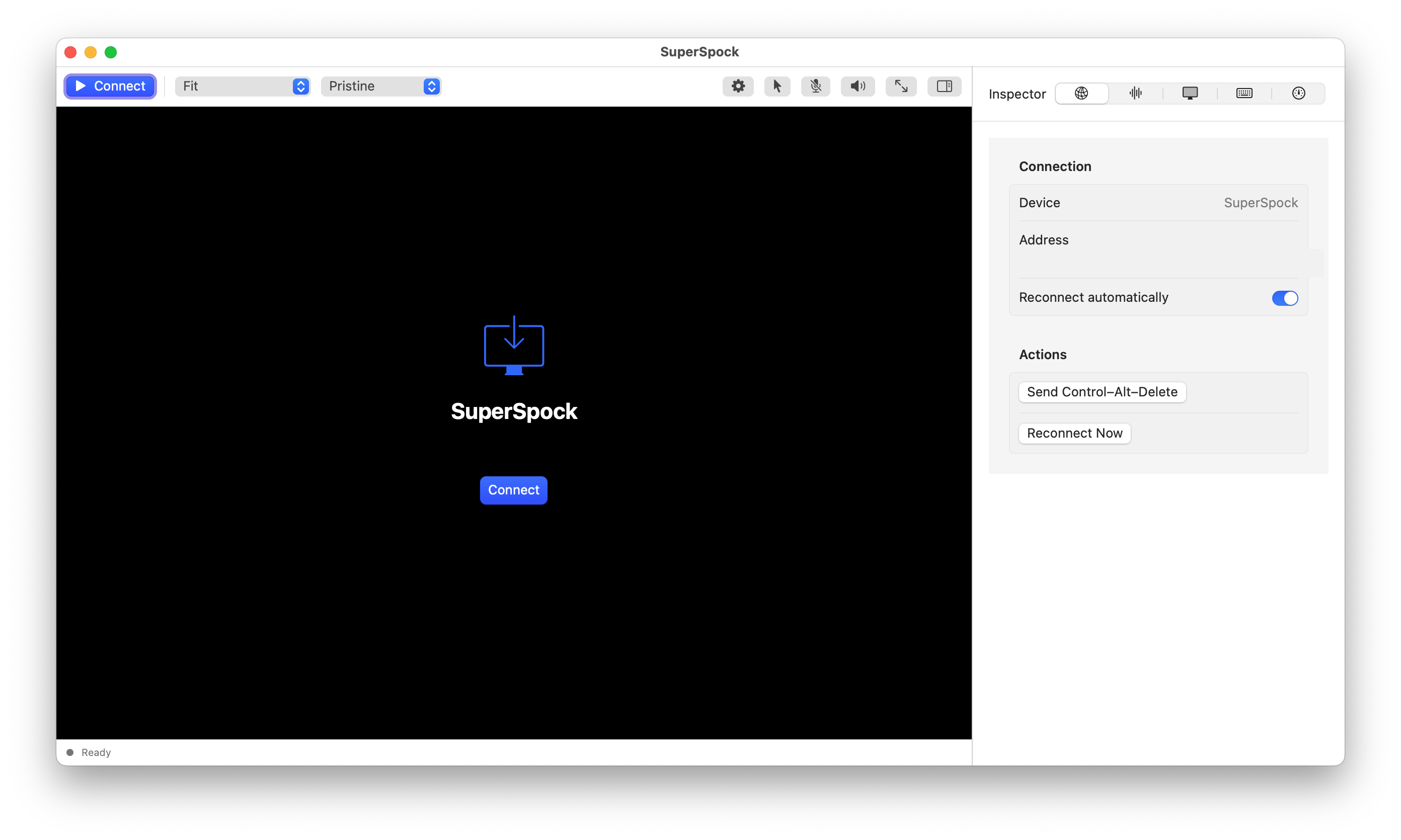
I keep the browser client open in a second window while testing the native one. If both stall at the same point, the device is the problem; if only the native client stalls, the problem is mine. That comparison is what caught the dead Janus endpoint before I found Pion.
Pion's config handshake requests a dedicated hid data channel alongside the video track. Wiring keyboard and pointer events into it is a smaller task than starting a new signaling channel from scratch.
authentication: succeeds
Pion negotiation: succeeds
video track: attached
ICE: connected
This is a progress record, not a claim that the native client is finished.
The browser client worked, but I wanted a real app.
Overlook and the RM1 frontend made the signaling paths less mysterious.
Resolver state and certificate behavior explained two different failures.
Pion negotiation succeeds and the native client receives a track; input wiring remains.
Verified: the project compiles without warnings, tests pass, the app launches with its own Dock icon, authentication succeeds, and the Pion negotiation runs end to end with ICE connected and a video track attached. The admin password and 2FA setup key stay in a private local vault with owner-only permissions; verification codes are generated locally.
Not working, or not yet proven:
- Input is not wired to the video surface. The native video path works, but keyboard and pointer events are not yet forwarded into the HID calls. A KVM you can't type into is a very expensive screenshot.
- Unattended login is unverified across firmware versions. GL.iNet has changed the login payload between releases, so the code lives in one small function.
- None of the nice things: no OCR capture, no device discovery, no menu bar agent.
Keyboard input failed for a while: paste worked, typing did not. macOS treated the bare executable as a background agent, so the window never became focused. Building a proper app bundle fixed that part.
The remaining gap is ordinary infrastructure: resolver state, certificate policy, process focus, and input routing. I’ll update this note when the native client can control the remote machine as well as display it.
What I learned
- Start with the network path. A client cannot compensate for a machine that cannot resolve the device name.
- DNS and TLS can fail in sequence. Fixing the hostname can expose a certificate problem that was hidden behind the first error.
- Protocol names matter. A working browser reference may use a different gateway than an older native client expects; on this RM1, Pion replaced the dead Janus path.
- Implemented is not finished. Video negotiation works, but the client still needs input routing before it becomes a complete KVM.
If I started over today
I would capture the browser exchange first, write down the exact hostname and certificate presented at each address, and make a tiny native proof-of-life before building the rest of the app. No inspector polish. No menu-bar dreams. Just: connect, negotiate, display one frame.
That sounds obvious now. It did not sound obvious while I was busy making a nice window around a video stream that had not arrived yet. This is why field notes exist.
// reference points
- rcawston/Overlook, an existing native GLKVM client that clarified the protocol.
- stasel/WebRTC, the Swift package wrapping Google's WebRTC engine.
- GL.iNet’s shipped RM1 frontend and the SuperSpock probe, which identified the Pion signaling flow and verified the live video track.
- GL.iNet Comet (GL-RM1) documentation
// end of transmission
$ echo "build it. break it better."_